
Buying your first drawing tablet can feel confusing because there are so many options. But as a beginner, you don't need an expensive professional tablet.
You need something affordable, reliable and easy to use so you can focus on learning and drawing instead of fixing technical problems.
Our suggestion: Start with a simple tablet that fits your budget and needs. This guide will help you choose the right drawing tablet, avoid unnecessary features and find options that are worth your money.
Do Beginners Need a Screen Tablet?
Short answer: No. For most beginners, a screenless tablet is a better and more affordable place to start.
There are three main types of drawing tablets:
Pen Tablets (Screenless)
You draw on a pad while looking at your computer screen. They are usually the cheapest option, making them great for beginners.
Pen Displays (With Screen)
You draw directly on the screen, just like paper. They feel natural to use but are usually more expensive.
Standalone Tablets
These are tablets like an iPad that work without a computer. They are convenient but can cost more.
If you're new to digital art, start with a screenless pen tablet. It may take a few days to get used to, but you'll save money and can upgrade later if you decide you need a screen.
What Actually Matters When Choosing a Beginner Tablet
You don't need to worry about every technical specification. As a beginner, focus on these important features:
Pressure Sensitivity
This controls how thick or thin your lines look when you press harder or softer. Most modern tablets offer 8,192 levels, which is more than enough for beginners.
Active Drawing Area
A medium-sized drawing area gives you enough space to draw comfortably without taking up too much desk space.
Express Keys
These are shortcut buttons for actions like undo, zoom or changing tools. They're not essential, but they can make drawing faster and easier.
Driver Reliability
Good drivers help your tablet work smoothly with your computer. Wacom, Huion, XP-Pen and Ugee are popular brands with good software support.
Software Compatibility
Most modern drawing tablets work with popular programs such as Photoshop, Krita, Clip Studio Paint and Affinity Designer. Still, check compatibility before buying.
What Should You Buy First?
Not sure which drawing tablet to choose? Start by thinking about how you want to draw and where you'll use it.
If You are Completely New to Digital Art
Start with a screenless pen tablet. It's affordable, simple and gives you everything you need to learn the basics.
If You Want to Draw Directly on the Screen
Choose a pen display. It feels more like drawing on paper and can be easier to understand if you don't like the screenless setup.
If You Want to Draw Without a Computer
A standalone tablet with a stylus is a good choice. You can draw anywhere without connecting it to a PC.
If You're Buying for a Student or Child
Choose a simple, compact pen tablet. You don't need advanced features when you're just learning.
Our suggestion: If you're unsure, start with a reliable screenless pen tablet. It's a simple way to learn digital art without spending too much and you can upgrade later if you need more.
Best Drawing Tablets for Beginners, by Type
Best Overall for Beginners: Medium Screenless Pen Tablet
A medium-sized screenless tablet is a great choice for most beginners. It gives you enough drawing space, good pressure sensitivity and useful shortcut buttons without the extra cost of a screen.
Look for: A comfortable drawing area, good pressure sensitivity, shortcut keys and a reliable USB connection.

XPPen Deco 640 Drawing Tablet
A compact 6×4-inch drawing tablet with 16,384 pressure levels and a battery-free stylus, suitable for digital drawing, illustration and creative work.
Best Budget Option: Compact Pen Tablet
If you're not sure whether digital art is right for you, a smaller pen tablet is a simple way to get started. It's easy to use and gives you the basic features you need for drawing.
Best for: Total beginners, kids and students.
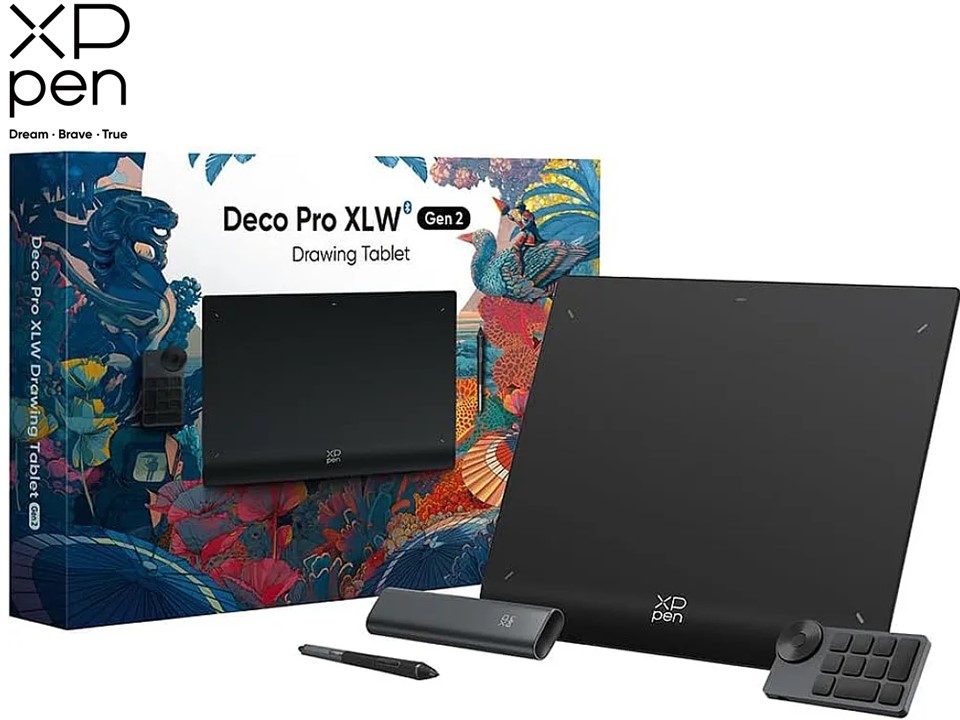
XP-Pen Deco Pro XLW Gen 2 Drawing Tablet
A large-format professional drawing tablet with a spacious work area, 16K pressure sensitivity and a design made for detailed digital art and creative workflows.
Best for Gifting: Well-Known Brand Pen Tablet
For a gift, choose a trusted brand with reliable drivers and simple setup. A smooth experience is more important than having the most advanced features.

Bosto T1060 V2 Drawing Tablet
A 10×6-inch Bosto drawing tablet designed for digital artists and designers, offering a larger workspace for drawing and creative projects.
A Few Things Beginners Should Know Before Buying
You don't need the most expensive option to get good. Line quality and pressure sensitivity on budget pen tablets are genuinely close to premium models today — the price difference mostly buys screen size, build materials and extra features, not core drawing quality.
The learning curve for screenless tablets is real but short. Most people adjust to the hand-eye disconnect within a few days of regular practice. Give it an honest week before deciding it's not for you.
Check software compatibility, not just the hardware. Confirm the tablet supports whatever art program you plan to use, though this is rarely an issue with established brands.
Watch for current deals before buying. Prices on drawing tablets fluctuate more than people expect, especially around back-to-school and holiday periods, so it's worth checking for an active discount code first.
Final Take
Choosing your first drawing tablet doesn't have to be complicated. You don't need an expensive professional setup to start learning digital art.
For most beginners, a screenless pen tablet is the easiest place to start. If you prefer drawing directly on a screen, a pen display may be a better fit. For drawing anywhere without a computer, consider a standalone tablet with a stylus.
Our suggestion: Choose a reliable tablet that matches your needs instead of paying for features you won't use. Start simple, practice regularly and upgrade later when you know what you really need.
Frequently Asked Questions
Yes. A screenless pen tablet can provide everything a beginner needs to start learning digital art. It may take some practice to get used to drawing while looking at a separate monitor, but the setup is affordable and widely used.
Start with an affordable model that provides reliable drivers, a comfortable drawing area, a responsive stylus and compatibility with your software. There's no need to spend heavily until you know which features you actually prefer.
Not necessarily. Pressure sensitivity is useful, but beginners shouldn't choose a tablet based only on the number of pressure levels. Pen feel, driver reliability, software compatibility and drawing area are also important.
Yes. A compatible iPad and stylus can be a convenient option for digital art, especially if you value portability. However, remember to consider the total cost of the tablet, stylus and any software you may want.
Not automatically. Some beginners prefer pen displays because they can draw directly on the screen, while others are perfectly comfortable with a screenless tablet. Your personal preference and budget should guide the decision.